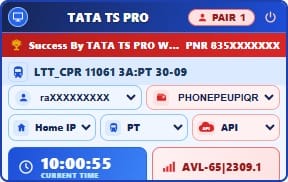
Tata TS Pro Tatkal Software
Tata TS Pro is a Web Login based Tatkal booking software built around a simple, ready-to-use booking workflow. The software is designed for users who want to manage their booking details from one interface instead of dealing with multiple manual setup steps.
Once you purchase Tata TS Pro from TSF Group, the applicable setup and license information are provided through your registered email and My Account dashboard. Download the setup, enter your license key and open the software to get started.
The main idea behind Tata TS Pro is simple: activate once, save your required information, open the software and start your booking workflow.
Web Login Tatkal Booking Software
Tata TS Pro uses a Web Login based workflow. There is no separate token-generation process required as part of the normal software workflow. Users can open the software, use the available login and booking interface, and continue with their required booking information.
This makes the software suitable for users who prefer a straightforward interface where the required information and booking workflow are managed from the software itself.
How Tata TS Pro Works
The setup process is designed to be simple and does not require users to manage complicated software settings.
1. Purchase Tata TS Pro
Select the available Tata TS Pro plan and complete your purchase through the TSF Group website.
2. Download the Software
After a successful purchase, the applicable setup download information and license details are available through your registered email and TSF Group My Account dashboard.
3. Enter Your License Key
Install or open the supplied setup and enter the license key provided with your purchase to activate the software.
4. Open Tata TS Pro
After activation, launch Tata TS Pro and access the available Web Login and booking interface.
5. Save Your Required Information
Enter the information required for your booking workflow and save the applicable details in the software where the feature is available.
6. Start Your Booking
When you are ready to book, open Tata TS Pro, review your saved information and start the available Tatkal booking workflow from the software interface.
Key Features of Tata TS Pro
- Web Login Workflow: Use the supported Web Login interface directly through the software.
- No Separate Token Workflow: Tata TS Pro does not require users to generate a separate booking token as part of its normal workflow.
- Ready-to-Use Setup: The software is designed to minimize unnecessary manual configuration after installation and activation.
- Save Booking Information: Save applicable booking details in the software so they can be available when you use the booking workflow again.
- Simple Booking Interface: Enter and manage the required information from the software interface before starting the booking process.
- License-Based Activation: Activate the purchased software using the license key supplied with your order.
- Automatic Setup Delivery: Applicable setup and license information are provided after successful purchase.
- My Account Access: Purchase and setup information can be accessed from the TSF Group My Account dashboard.
Save Your Details and Start Booking
One of the main conveniences of Tata TS Pro is its software-based workflow for managing frequently used booking information. Instead of entering the same information from the beginning every time, users can save the applicable details in the software and use them when starting a new booking session.
Before starting a booking, users can review the saved information, make any required changes and then continue with the available booking workflow.
Tata TS Pro Without Complicated Manual Settings
Tata TS Pro is designed with a straightforward setup approach. After installing the supplied software and activating it with the purchased license key, users can access the available features without needing to configure multiple separate settings for the normal workflow.
This keeps the process simple for users who want a dedicated software interface for their Tatkal booking requirements.
Tatkal Booking Workflow in One Software
Tata TS Pro brings the main steps of the booking workflow into one software interface. Users can access the Web Login workflow, manage applicable saved information, enter or review passenger and journey details, and proceed with the available booking process.
The software is intended to make the overall workflow more organized and easier to manage, while the actual booking remains subject to the availability, rules and systems of the applicable railway booking service.
Who Is Tata TS Pro For?
Tata TS Pro is designed for users looking for a dedicated Tatkal booking software with a Web Login based workflow and a simple activation process.
It can be useful for users who prefer to keep their applicable booking information in one place and want to avoid repeatedly managing multiple manual setup steps before using their booking software.
License and Setup Delivery
After purchasing Tata TS Pro from TSF Group, the applicable software setup and license information are provided to the registered customer through the available delivery system.
Customers can also access their purchase information through the My Account dashboard on the TSF Group website.
Download the setup, enter the supplied license key, activate the software and then use the available Tata TS Pro booking interface.
Why Tata TS Pro?
Tata TS Pro focuses on a simple software experience rather than making users manage a long list of manual configuration steps.
- Web Login based booking workflow
- No separate token-generation step in the normal workflow
- License-based activation
- Save applicable booking information
- Simple booking interface
- Setup available after purchase
- Purchase information available through My Account
- Designed for a streamlined Tatkal booking workflow
Buy Tata TS Pro Tatkal Software
If you are looking for a Tatkal booking software with Web Login, saved booking information and a straightforward activation process, Tata TS Pro is available through TSF Group.
Choose the available plan, complete your purchase and follow the setup information provided with your order. After activation, open Tata TS Pro, review your saved information and use the available booking workflow when required.
Check the current price, plan validity, availability and product requirements on this page before purchasing.
Frequently Asked Questions
What is Tata TS Pro?
Tata TS Pro is a Web Login based Tatkal booking software designed to provide a simple software-based booking workflow.
Does Tata TS Pro require token generation?
No separate token-generation step is required as part of the normal Tata TS Pro workflow. The software is designed around its Web Login and booking interface.
Do I need to configure the software manually?
Tata TS Pro is designed to minimize manual configuration. After installing the supplied setup and activating the software with your license key, users can access the available booking interface.
Can I save my booking information?
Yes. Tata TS Pro is designed to allow applicable booking information to be saved in the software where the feature is available, making it easier to use the information again during a future booking session.
How do I activate Tata TS Pro?
Download the supplied setup, open the software and enter the license key provided with your purchase. After successful activation, you can access the available Tata TS Pro features.
How do I receive the Tata TS Pro setup?
After successful purchase, the applicable setup and license information are provided through the registered email and are also available through the TSF Group My Account dashboard.
Does Tata TS Pro have Web Login?
Yes. Tata TS Pro is built around a Web Login based workflow for the supported booking process.
Is Tata TS Pro fully automatic?
Tata TS Pro is designed to automate and simplify the supported software workflow, including accessing the Web Login interface and working with saved booking information. The actual booking remains dependent on the applicable railway booking system, availability and its rules.